Find the first run that can send
Sign in to save your progressA shop wants review invitations to go out while support is available. One order has reached its ten-day wait by Tuesday at 08:10. The module may send on Tuesday from 08:00 to 09:00. Processing runs at 08:05, 08:35 and 09:15. Which run can pick up this invitation?
The flow delay makes this buyer eligible at 08:10. The module window permits Tuesday morning. The 08:35 processing run is the first one that meets both conditions. Assume the buyer still qualifies and sending is enabled.
Open System → Extensions → Add-ons → Sending and scheduling → Schedule sending by module → Edit schedule. Find the module or its email step. Select timed processing, then set its weekdays and time window.
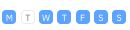
The screenshot shows a different schedule. Tuesday is off. Even an 08:35 run on Tuesday would miss that step until its schedule changed.
Worked example
The module allows Monday 09:00–10:00. An invitation becomes due at 09:40. Runs at 09:15 and 10:15 both miss it. Put a run at 09:45 and check the result in sending status.