What would you like to learn?
Practise email marketing for your shop. Work through a decision for a sample shop, then check what you learned.
Basic learning path
Prepare your shop email, bring buyers back with ready-made flows and send your first seasonal newsletter.
Start learning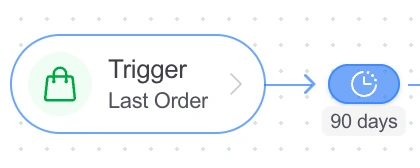
The first wait begins when the latest order reaches Shipped. 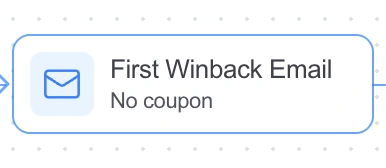
After 90 days, the first email invites the customer back. 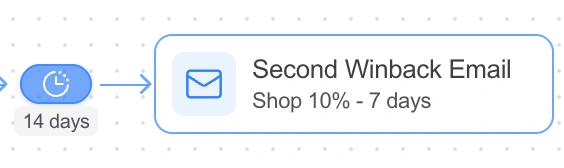
If the buyer still hasn’t ordered, a second invitation can follow 14 days later.
Prepare your shop for MailBeez email
Create a recognizable email design, prepare a reusable offer and choose a sending route you can trace. Use these preparations for a newsletter or any ready-made flow.
23 minBring past customers back with a ready-made flow
Use existing order history to predict who qualifies, set the wait between two invitations and rehearse the emails in a test shop or on paper. Start here if your shop is already prepared.
21 minHelp a shopper place their first order
Use registration, order history and a saved cart to decide which invitation would help. Rehearse the first-order flow with two test accounts.
8 minAsk for a product review after delivery
Use a shipped order to time a review invitation. Decide who gets a reminder and which purchased items belong in it.
9 minSend birthday wishes at the right time
Use a saved birthday to send one personal greeting each year. Choose when it can arrive and whether to include a gift.
7 minCelebrate the day a customer joined
Turn the account registration date into a yearly thank-you. Check which accounts qualify and write a greeting that works beyond the first anniversary.
7 minAnswer a customer with Customer Insight
Follow one enquiry from a shop order to the customer’s email history. Use the dates and recorded events to write a useful reply.
5 minTell prospects, customers and buyers apart
Follow a newsletter signup into a shop account, then interpret the conversion report for a group of signups.
6 minTest newsletter signup as a shopper
Follow a prospect and a shop customer from the signup form through double opt-in. Check the promise, the confirmation link and the recorded subscription.
7 minChoose customer groups for a mailing
Decide which shop accounts may receive a retail offer. Read the group assignment for one flow and choose an audience for a one-off newsletter.
5 minWhat did this customer unsubscribe from?
Use the wording of a review invitation and the recorded block to explain which messages a customer has stopped.
6 minGive a module a sending window
Bring together the flow delay, permitted hours and processing runs. Use the three dates or times to explain when a due email can go out.
5 minKeep checkout test addresses out of mailings
Write one literal address rule, predict which addresses it catches, and spot a real customer it might exclude by mistake.
4 minSend one newsletter for a seasonal event
Prepare one timely mailing for Black Friday, Christmas or Easter. Choose the recipients, write a useful promise and verify the deadline from a subscriber’s phone.
10 minAdvanced learning path
Build an audience from past purchases, import contacts by topic and set up follow-ups after a purchase or a Black Friday newsletter.
Start learningExplain a change in newsletter clicks
Compare two sends, find which figure changed and choose what to investigate before editing the next newsletter.
8 minBuild, test and use a product audience
Offer the right accessory to buyers who still need it. Combine two purchase filters, check individual customers and see which emails use the audience.
7 minImport contacts into a newsletter topic
Move recorded interests from an old signup form into MailBeez. Choose the topic, set confirmation correctly and check what happened to each address.
7 minWrite a welcome email with an optional coupon
Write one useful welcome email and preview what shoppers see with and without a coupon.
9 minBuild a custom flow from purchase history
Choose between product and category rules, test two buyers and connect the audience to a useful email.
12 minPlan a Black Friday warm-up with follow-ups
Build an early-access email, a reminder for interested customers, and a Friday launch. Read the delay from the right event and stop reminders when the offer changes.
12 minChoose your next automation from shop data
Use customer counts and two order histories to decide which flow deserves your next hour.
10 min