Start with two addresses
Sign in to save your progressNorth Mill Coffee offers a monthly newsletter called “First brews”. A visitor and a returning customer should both know what they signed up for. Use two inboxes you control. One address is new to the shop; the other belongs to an existing customer who has yet to subscribe.
Open Contacts → Signup Confirmation. Find Signup Form, then the two branches under DOI Email. DOI means double opt-in. Each person submits the form and follows a link in their own confirmation email.
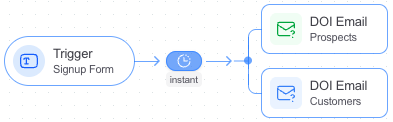
Read the form and both email versions aloud. Try “Confirm my subscription to First brews” as the link text. It should be clear what will happen when the reader taps it. If your shop uses the storefront signup integration, test the form on the page where customers actually find it. Signup confirmation and form integration
Compare shop examples
- Coffee & equipment · North Mill Coffee
- Pet food & equipment · Paw & Pine
- Wine & cellarware · Terrace Cellars
- Clothing & care · Linden Knitwear
- Electronics & supplies · Pixel & Paper
Coffee & equipment · North Mill Coffee
North Mill Coffee offers a monthly newsletter called “First brews”. A visitor and a returning customer should both know what they signed up for. Use two inboxes you control. One address is new to the shop; the other belongs to an existing customer who has yet to subscribe.
Read the form and both email versions aloud. Try “Confirm my subscription to First brews” as the link text. It should be clear what will happen when the reader taps it. If your shop uses the storefront signup integration, test the form on the page where customers actually find it. Signup confirmation and form integration
Pet food & equipment · Paw & Pine
Paw & Pine offers a monthly newsletter called “Walking tips”. A visitor and a returning customer should both know what they signed up for. Use two inboxes you control. One address is new to the shop; the other belongs to an existing customer who has yet to subscribe.
Read the form and both email versions aloud. Try “Confirm my subscription to Walking tips” as the link text. It should be clear what will happen when the reader taps it. If your shop uses the storefront signup integration, test the form on the page where customers actually find it. Signup confirmation and form integration
Wine & cellarware · Terrace Cellars
Terrace Cellars offers a monthly newsletter called “Serving wine”. A visitor and a returning customer should both know what they signed up for. Use two inboxes you control. One address is new to the shop; the other belongs to an existing customer who has yet to subscribe.
Read the form and both email versions aloud. Try “Confirm my subscription to Serving wine” as the link text. It should be clear what will happen when the reader taps it. If your shop uses the storefront signup integration, test the form on the page where customers actually find it. Signup confirmation and form integration
Clothing & care · Linden Knitwear
Linden Knitwear offers a monthly newsletter called “Knitwear care”. A visitor and a returning customer should both know what they signed up for. Use two inboxes you control. One address is new to the shop; the other belongs to an existing customer who has yet to subscribe.
Read the form and both email versions aloud. Try “Confirm my subscription to Knitwear care” as the link text. It should be clear what will happen when the reader taps it. If your shop uses the storefront signup integration, test the form on the page where customers actually find it. Signup confirmation and form integration
Electronics & supplies · Pixel & Paper
Pixel & Paper offers a monthly newsletter called “Printing tips”. A visitor and a returning customer should both know what they signed up for. Use two inboxes you control. One address is new to the shop; the other belongs to an existing customer who has yet to subscribe.
Read the form and both email versions aloud. Try “Confirm my subscription to Printing tips” as the link text. It should be clear what will happen when the reader taps it. If your shop uses the storefront signup integration, test the form on the page where customers actually find it. Signup confirmation and form integration