Start with the order reference
Sign in to save your progressA buyer asks, “Was that review invitation for my June order of Field hand grinder?” Two accounts share the same surname. Ask for the order reference or email address. Under Contacts → Customers, find the matching account and choose Actions → Customer Insight. Depending on your integration, you can also open the customer panel from the order.
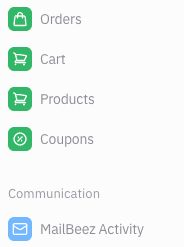
Start with Orders. Find the order reference, check the order date and open its items. Then open MailBeez Activity and find the relevant mailing and send date. The panels available depend on the shop integration, installed modules and your role.
Order #431 includes “Field hand grinder” and shipped on 4 June. A review invitation was sent on 14 June. A second order containing “House espresso · 1 kg” shipped the same day. Look for an order reference or item in the send details, if available. Until you can link the records, confirm only the address and send date.
Worked example
Two buyers have the same surname. The caller supplies order 704. Match the order and its address to one account before reading the email history. A recent send to the other account would answer a different customer’s question.
Compare shop examples
- Coffee & equipment · North Mill Coffee
- Pet food & equipment · Paw & Pine
- Wine & cellarware · Terrace Cellars
- Clothing & care · Linden Knitwear
- Electronics & supplies · Pixel & Paper
Coffee & equipment · North Mill Coffee
A buyer asks, “Was that review invitation for my June order of Field hand grinder?” Two accounts share the same surname. Ask for the order reference or email address. Under Contacts → Customers, find the matching account and choose Actions → Customer Insight. Depending on your integration, you can also open the customer panel from the order.
Order #431 includes “Field hand grinder” and shipped on 4 June. A review invitation was sent on 14 June. A second order containing “House espresso · 1 kg” shipped the same day. Look for an order reference or item in the send details, if available. Until you can link the records, confirm only the address and send date.
Pet food & equipment · Paw & Pine
A buyer asks, “Was that review invitation for my June order of Trail walking harness?” Two accounts share the same surname. Ask for the order reference or email address. Under Contacts → Customers, find the matching account and choose Actions → Customer Insight. Depending on your integration, you can also open the customer panel from the order.
Order #431 includes “Trail walking harness” and shipped on 4 June. A review invitation was sent on 14 June. A second order containing “Meadow kibble · 4 kg” shipped the same day. Look for an order reference or item in the send details, if available. Until you can link the records, confirm only the address and send date.
Wine & cellarware · Terrace Cellars
A buyer asks, “Was that review invitation for my June order of Arc glass decanter?” Two accounts share the same surname. Ask for the order reference or email address. Under Contacts → Customers, find the matching account and choose Actions → Customer Insight. Depending on your integration, you can also open the customer panel from the order.
Order #431 includes “Arc glass decanter” and shipped on 4 June. A review invitation was sent on 14 June. A second order containing “Hillside Riesling · 6 bottles” shipped the same day. Look for an order reference or item in the send details, if available. Until you can link the records, confirm only the address and send date.
Clothing & care · Linden Knitwear
A buyer asks, “Was that review invitation for my June order of Alder merino pullover?” Two accounts share the same surname. Ask for the order reference or email address. Under Contacts → Customers, find the matching account and choose Actions → Customer Insight. Depending on your integration, you can also open the customer panel from the order.
Order #431 includes “Alder merino pullover” and shipped on 4 June. A review invitation was sent on 14 June. A second order containing “Wool wash · 12 sachets” shipped the same day. Look for an order reference or item in the send details, if available. Until you can link the records, confirm only the address and send date.
Electronics & supplies · Pixel & Paper
A buyer asks, “Was that review invitation for my June order of Pocket P2 photo printer?” Two accounts share the same surname. Ask for the order reference or email address. Under Contacts → Customers, find the matching account and choose Actions → Customer Insight. Depending on your integration, you can also open the customer panel from the order.
Order #431 includes “Pocket P2 photo printer” and shipped on 4 June. A review invitation was sent on 14 June. A second order containing “P2 photo paper · 50 sheets” shipped the same day. Look for an order reference or item in the send details, if available. Until you can link the records, confirm only the address and send date.